Question: “Do you use Photoshop for your pinup photographs?” Yes. I do. Photoshop is a tool used by most professional photographers because it allows photographers to transform a standard scene into a work of art. HOWEVER most (but not all) professional photographers also tend to use the camera for as many effects as possible.
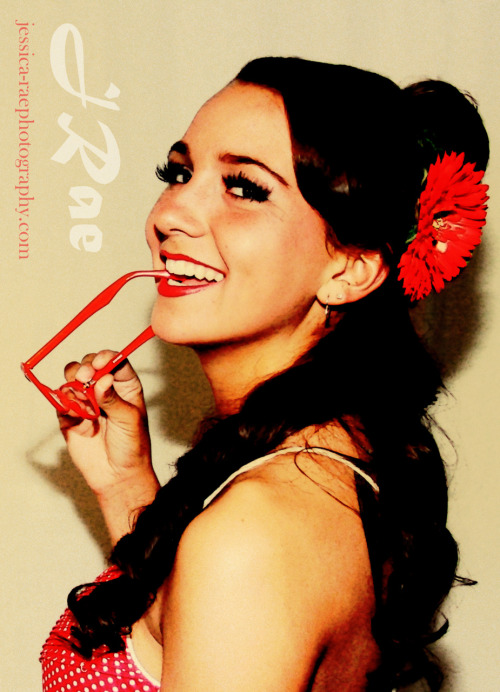
How did I use my camera as much as possible for this photograph?
1. I set the white balance on my camera for orange/yellow hue lights. Most DSLR cameras have a setting for this, but I like to use the custom setting.
2. I used orange/yellow-toned lighting in the studio (warm-toned light bulbs) with a diffuser. In my case - I used a semi-worn-out quartz lighting system with a white backdrop.
3. I used my camera on MANUAL MODE. Set your ISO to 80 or 100 and then use different f-stop and shutter speed settings to accomplish a slightly over-exposed photograph. Don’t over-expose it too much because it will wash out the colors. You really only need one stop.
4. I used a flash with a diffuser. This helps to bring out some of the more vivid colors - in her case her dress. The dress was actually fire-engine red so it washed out the colors a little. I would suggest having your model wear vivid colors.
5. I use lens filters: Diffusion filters have been very helpful to me for pinup. I recommend one with a slight amber tone.
6. I shoot in RAW so that I can tweak the exposure if I need to during the development stage
The after-effects are MINOR and include layers in photoshop. One thing that I usually always have to do is invert the most-important features of the photograph (select the smudge tool and then press Ctrl Alt 2 in CS4. In CS3 I think you use Ctrl Alt ~). Paste them to a new layer and select overlay. You will see that this makes a big difference.
Sometimes I add a layer blended to MULTIPLY using the photocopy filter in Photoshop. It helps define the differences around the model and helps it to have the aged look.
Another thing I typically do after the fact is add a layer of 50% gray blended to overlay with the color removed. I like to do this because adding graininess also helps the photo look aged.
So there you go. I hope this post helps to answer questions about pinup photography.
